Blog
Get Pay Right on ADP Workforce Now® Next Gen™
Bringing trusted compensation intelligence and seamless planning to even more ADP users.
Written by Salary.com Staff
August 28, 2026

A hiring process flowchart gives your HR team and hiring managers a clear visual map of every step from job requisition to onboarding. Organizations that document their recruitment workflow fill roles faster, reduce bias, and deliver a stronger candidate experience.
Thousands of compliant templates. Save hours of work.
This guide covers what a process flowchart is, how to build one, and where to find templates.
A hiring process flowchart is a visual diagram that tracks the entire hiring process using rectangles for tasks, diamonds for decision points, and ovals for start and end points. It gives hiring managers, HR teams, and recruiters a shared reference so every person involved in talent acquisition follows the same order and understands their responsibilities.
According to the Society for Human Resource Management, the average cost per hire reached $4,700. A documented process flow can reduce that figure by eliminating bottlenecks.
| Benefit | How it helps your organization |
|---|---|
| Reduces hiring costs | Streamlines processes so HR departments spend less on redundant job postings and repeat information |
| Improves candidate experience | Potential candidates move through clear stages without unnecessary delays |
| Enhances internal communication | Hiring team members know exactly who owns each step |
| Supports compliance | Helps human resources teams document adherence to labor laws and reduce bias |
| Identifies inefficiencies | Flowcharts help identify delays and bottlenecks so teams can fix them before they lose top talent |
Before you build a recruiting process flow chart, you need to understand the core stages most recruitment processes share. The recruitment process generally narrows down candidates through multiple stages, starting broad and ending with a single new employee joining the company.
A report found that companies with a clearly defined recruitment plan are 2.5 times more likely to make quality hires.
Job requisition and approval: Identify the staffing need, define the role, and obtain budget approval.
Job description creation: Include required and preferred qualifications, responsibilities, compensation, and benefits.
Sourcing candidates: Post the job opening on job boards, your career page, social media, and job fairs. Consider internal recruitment and internal candidates.
Screening and assessment: Recruiters review incoming resumes and cover letters. Initial phone screenings assess communication skills and cultural fit.
Interviews: First round interviews focus on technical competencies. Final panel interviews evaluate problem solving and long term potential. Interviews include structured evaluations and feedback.
Background and reference checks: Background checks are necessary before extending a job offer. Reference checks verify employment history and educational credentials.
Offer extension: Includes compensation and benefits details. Hiring managers and HR collaborate on the final decision.
Onboarding: Introduce new hires to the team and train them on company culture. Onboarding can significantly improve employee retention rates.
Process closure: Measure time to fill, cost per hire, and quality of hire to improve future cycles.
HR teams can also use CompAnalyst® Job Matching to compare the position with relevant market jobs. This provides additional market context when evaluating the role and preparing for the hiring process.
Building a recruitment process flowchart does not require design experience. Follow these five steps to create a clear, actionable diagram that your entire hiring team can use from day one.
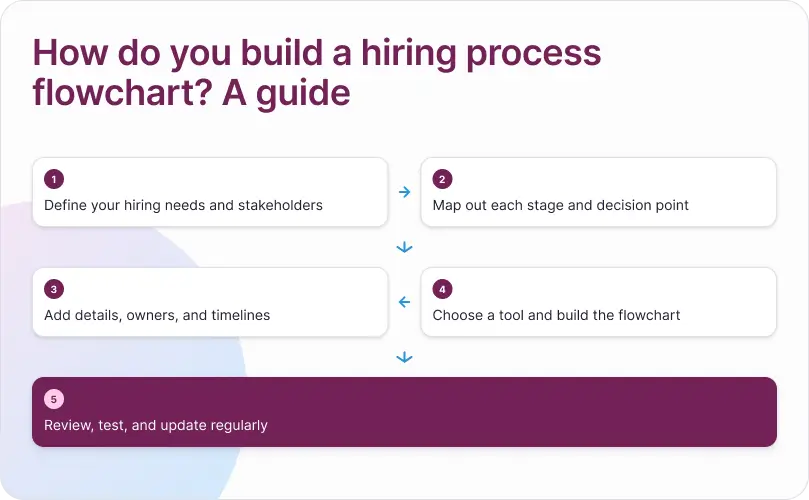
Start by identifying the specific hiring needs for the open role. Meet with the hiring manager and HR department to clarify the job title, required skills, and timeline. Determine which people will be involved, from sourcers to final decision makers. Failing to define roles at this stage leads to miscommunication, which is a common mistake organizations make.
Once the hiring needs are defined, HR teams can use JobArchitect® to create and manage consistent, market-aligned job descriptions. This helps establish clear role expectations before candidates enter the recruitment process.
List every step your organization follows from job opening approval to the moment a new employee starts. Skipping decision points leads to unclear candidate paths, so be thorough. Make sure each stage has a clear output that determines whether applicants advance to the next stage.
For each step, add details about who is responsible and how long it should take. For example, phone screening might be owned by the recruiter with a two day turnaround, while the final interview might require coordination among three managers. This prevents the hiring team from duplicating effort or losing qualified candidates to slow responses.
When documenting compensation-related details in the hiring workflow, CompAnalyst® Market Pricing can help HR teams evaluate market pay for the role. This gives hiring teams useful compensation context when preparing salary information for candidates.
Use a professional flowchart generator for clarity. Popular options include Lucidchart, Microsoft Visio, Miro, and free tools like Canva. Select a flowchart template or start from a blank canvas. A linear flowchart works well for straightforward roles, while complex positions may need branching paths. Candidates may complete practical assignments, and your chart should account for that step.
Share the draft with your hiring team and run a recent requisition through the flowchart to test it. Not updating flowcharts can result in outdated processes, so schedule quarterly reviews. Overcomplicating flowcharts can confuse users, so keep the design clean and only include steps that create real value in the selection process.
Starting from a pre built template saves your HR team time while ensuring you adhere to industry design standards. However, choosing the wrong format can result in confusion and poor adoption. Below are the four main recruitment flowchart archetypes, including structural previews, best use cases, and implementation tips.
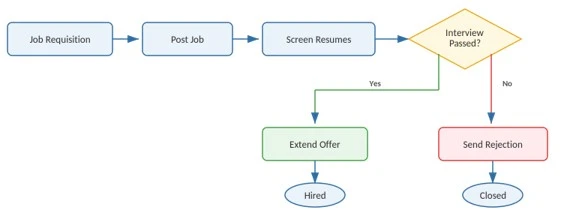
Best for: Small businesses, startups, entry level positions, or simple one to two round hiring processes.
Structure: A straightforward, sequential path from top to bottom or left to right.
Key features: Single decision nodes, clear start and end boundaries, minimal complexity.
Recommended tool: Canva (search "Simple Process Flowchart") or Lucidchart (search "Linear Workflow").
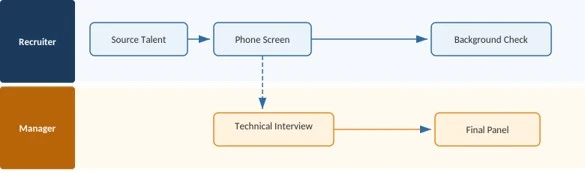
Best for: Mid size to enterprise organizations where responsibilities are split across HR, recruiters, hiring managers, and department leads.
Structure: Rows or columns divided by role or department to show clear ownership at every step.
Key features: Prevents task overlap, clearly highlights handoffs between departments, and identifies cross functional delays.
Recommended tool: Lucidchart or Creately (search "Swimlane Recruitment Map").
Best for: Roles requiring multi stage technical evaluations, practical assessments, portfolio reviews, or background clearances.
Structure: Employs multiple decision diamonds that route candidates down distinct paths based on test scores, salary expectations, or security checks.
Key features: Explicit conditional logic, dual outcomes for every evaluation stage, clear routing for rejected candidates.
Recommended tool: Miro or Microsoft Visio (search "Decision Tree Process Flow").

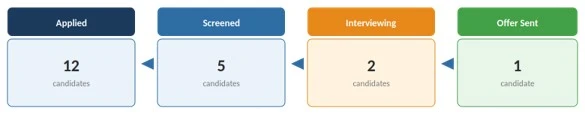
Best for: High volume recruiting, seasonal hiring, hourly workforce acquisition, or agile HR teams tracking active applicant pipelines.
Structure: Column based card movement representing stages from Applied to Hired.
Key features: Live tracking of individual candidate counts across stages, visual identification of talent bottlenecks.
Recommended tool: Trello, Asana, or Figma Community Templates (search "Recruitment Pipeline Board").
Auto-matching tools for a clear, fair organization.
Here are the frequent questions about hiring process flowchart:
A flowchart is a visual diagram showing sequence and decision points across the entire recruitment process. A checklist is a simple task list without showing how steps connect. Flowcharts improve internal communication because they make the process flow visible.
Yes. Most organizations create a master recruitment process flowchart and customize it by department or seniority. A technical role might include a coding assignment, while a sales role might add a role play exercise. The core stages stay the same, but you adjust interview rounds and assessment types.
Most effective flowcharts include between seven and twelve steps covering job requisition through onboarding and process closure. A flowchart can reduce hiring costs and improve compliance only if it is clear enough for the entire team to follow.
Common mistakes include overcomplicating the flowchart, failing to define roles for each step, skipping decision points, and not updating the diagram as your process evolves. Another frequent error is ignoring candidate experience. Your flowchart should ensure applicants receive timely communication and a professional impression of your company culture.

The latest research, expert advice, and compensation best practices all in one place.
Blog
Bringing trusted compensation intelligence and seamless planning to even more ADP users.

Blog
Learn how to train managers for effective pay conversations and build trust.

Blog
Total rewards package flexibility lets employees choose what matters - pay, perks, and benefits tailored to their needs.