Blog
Get Pay Right on ADP Workforce Now® Next Gen™
Bringing trusted compensation intelligence and seamless planning to even more ADP users.
Written by Salary.com Staff
September 19, 2025

Artificial intelligence (AI) has grown rapidly, shifting from a futuristic concept to a practical tool used across multiple industries. Once limited to fields like finance and technology, AI is now transforming human resources by enabling smarter, data-driven decisions, simplifying workflows, and improving the overall employee experience.
Fine-tuned LLMs. Your 24/7 intelligent comp analyst.
A study conducted by Exploding Topics shows that 77% of companies are either implementing or exploring the use of AI in their operations, while 83% consider it a central priority in their business strategy.
This guide provides an overview of AI in the workplace, outlining its pros and cons and how HR teams can implement it effectively.
Artificial intelligence (AI) in the workplace refers to the use of software or machines capable of learning from data and performing tasks that require analysis or decision-making.
Unlike conventional software, which follows fixed rules, AI improves its performance over time by processing data and learning from new inputs. This capability allows AI to improve workplace efficiency by automating mundane tasks and supporting complex decision-making processes.
In human resources, AI is rapidly becoming a practical tool. Between 35% and 45% of organizations have now integrated AI to streamline their hiring and recruitment processes, according to an SHRM study.
Just a few examples of artificial intelligence are:
Predictive AI: Looks at workforce data to forecast outcomes like employee retention or turnover.
Generative AI: Produces resources like training programs, performance assessments, or policy documents.
Conversational AI: Communicates with employees through natural dialogue using chatbots or virtual assistants.
Furthermore, more advanced AI systems, called agentic AI, are now emerging. These platforms, like Salary.com’s business AI tool, can operate autonomously, generating career path suggestions, compliance training, and other HR strategies based on the data they analyze.
Adopting AI has both benefits and challenges. Understanding these helps HR leaders use AI tools safely and effectively.
Improved efficiency and productivity: AI tools can automate routine tasks such as scheduling, payroll, and basic queries, giving HR more time for strategic work.
Improved accuracy: AI analyzes a vast amount of data quickly, spotting patterns and risks that manual processes may miss.
Scalability: As organizations expand, AI systems enable HR to manage complex processes without requiring proportional staff increases.
Data-driven insights: AI systems provide evidence-based analysis that supports objective decision-making, consistent benchmarking, and trend monitoring. It also aids talent management and future workforce planning.
Improved employee experience: AI chatbots offer immediate responses, personalized support, and tailored career development tools, enhancing employee satisfaction and retention.
Cost savings: More efficient hiring, better candidate matching, and optimized training contribute to more cost-effective HR operations.
Lack of human connection: AI can handle many repetitive tasks, but it sometimes makes communication feel less personal. If employees feel they are dealing with a system instead of a person, engagement and trust can suffer.
Algorithmic bias: AI tools used for recruitment or performance reviews are only as objective as the training data behind them. If that data carries bias, the system may unintentionally reinforce it.
Concerns about job loss: About a third of employees worry that AI will result in fewer job opportunities over time. That's why explaining how AI technology will support their work and pointing out the benefits it brings to their roles can ease those concerns and help with adoption.
Data privacy: AI platforms process sensitive employee data such as performance information, health details, and personal identifiers. HR teams need strong safeguards and regular audits to protect this information and maintain trust.
Regulatory pressures: Labor laws and privacy regulations continue to evolve. Human resources teams need to continuously monitor evolving regulations to ensure ongoing compliance.
Now that you understand how artificial intelligence in the workplace works, here are the key steps you can take to use AI in the workplace effectively:
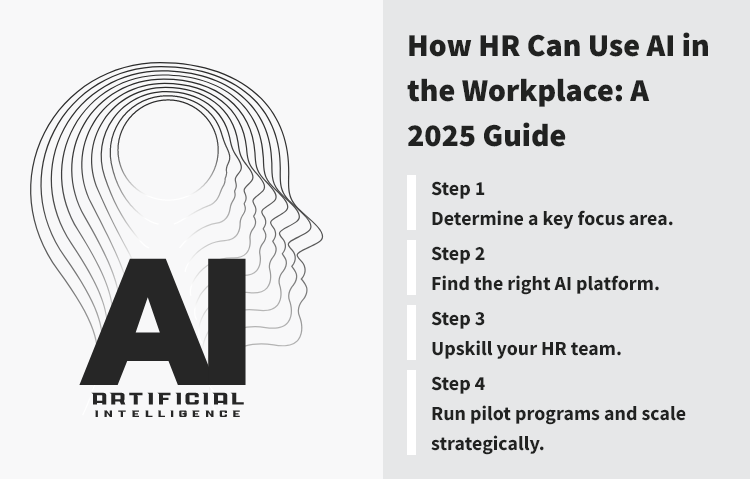
Begin by selecting a key HR function where AI can deliver the greatest impact, such as:
Recruitment: Automate resume screening, candidate scoring, and outreach to save time and enhance the candidate's experience.
Learning & Development (L&D): Personalize learning paths and recommend courses.
Performance management: Leverage AI tools for continuous feedback and automated performance evaluations.
Focusing on a single function is crucial as it allows for testing, measurement, and refinement before extending AI adoption to additional areas.
Choose AI platforms that integrate seamlessly with your current HR tech stack and existing workflows. Make sure they offer:
Smooth integration
Transparent artificial intelligence models
Compliance with data protection regulations
Comprehensive analytics and reporting
Salary.com’s AI-driven solutions provide these features, helping HR leaders integrate advanced analytics within existing systems without disruption.
The success of AI adoption depends on your team’s proficiency. Focus on AI literacy by providing workshops on AI technology, its applications, and ethical considerations. Offer certifications in people analytics and data-driven HR practices.
Additionally, you can organize internal knowledge-sharing sessions to promote ongoing learning and development.
Pilot programs are essential for evaluating AI systems’ impact. For example, run a three-month pilot of AI-driven candidate screening limited to one department, and conduct a test of AI-powered learning recommendations for a specific business unit.
Monitor indicators like time efficiency, accuracy, participation levels, and employee input. Use these insights to improve strategies and expand applications.
Here are the nine examples of artificial intelligence in the workplace:
Resume screening software
AI platforms analyze a vast number of applications, filter out unqualified candidates, and provide ranked lists of strong applicants, significantly reducing the time HR professionals spend on manual review.
For example, Amazon created an AI-based recruitment system to streamline resume screening and identify top candidates efficiently.
HR chatbots
Intelligent assistants respond promptly to employee inquiries about policies, benefits, leave requests, or training resources, ensuring accurate information is consistently available.
For example, Unilever has an HR helpdesk chatbot that serves as a virtual assistant, available 24/7 to respond to frequently asked questions related to company policies, employee benefits, and procedures.
Predictive analytics for retention
AI solutions examine patterns in absenteeism, performance, and survey feedback to identify employees at risk of leaving, enabling managers to take proactive measures to retain key talent.
For example, IBM achieved a 30% decrease in employee attrition by implementing AI-driven initiatives, according to SHRM.
AI-assisted scheduling
AI scheduling tools optimize shifts for coverage, compliance, and employee preferences, reducing conflicts and last-minute adjustments.
Personalized learning recommendations
AI platforms suggest targeted training modules based on role, career objectives, and past performance, facilitating structured professional development.
For example, PepsiCo’s Pep U Degreed uses machine learning to personalize training opportunities for each employee, considering their skills, interests, peer networks, and preferred ways of learning.
Diversity and inclusion monitoring
Algorithms analyze hiring, promotion, and compensation data to identify potential gaps or biases, providing HR teams with actionable insights to support equitable practices.
Performance management tools
AI evaluates productivity metrics and generates feedback reports, assisting managers in recognizing achievements and addressing performance objectively.
For example, GoCanvas transitioned from a manual performance review system to an automated platform that leverages quantitative data to categorize top employees as “rockstars” and “superstars,” removing the risk of bias and ensuring fair recognition.
Compliance monitoring systems
AI tools track changes in labor laws and regulations, review internal policies, and flag potential areas of non-compliance, helping organizations mitigate legal and financial risks.
Compensation analysis and optimization
AI tools analyze salary data across roles, departments, and regions to ensure competitive and equitable compensation, recommend adjustments, and support budget planning.
For example, American Cedar & Millwork, a cabinetry company, struggled with scheduling and payroll for employees with variable shifts and overtime, relying on manual reporting and time clocks. After adopting an automated system, they cut overtime by more than 25% and boosted productivity by 25–30%.
Discover how these cutting-edge AI tools, including powerful platforms like Salary.com’s business AI, can streamline your HR processes, boost productivity, and create a fairer, more efficient organization.
Here are some questions about or related to the topic:
It is legal to use AI at work, but states and cities can regulate how it is implemented. The Harvard CLJE report explains that governments may require AI systems to meet safety standards, prevent interference with workers’ rights, and follow transparency and fairness rules. Some states are considering “AI bills of rights” to guarantee protections such as notice, human oversight, and safeguards against bias.
The positive impact of AI on employment includes generating new job opportunities in emerging sectors that focus on innovation and strategic thinking. AI also enhances job satisfaction by taking over repetitive tasks, enabling workers to focus on more meaningful and purposeful work. Furthermore, AI increases overall efficiency and productivity by optimizing processes and supporting better-informed decision-making.
The rules for using AI in the workplace emphasize the importance of greater transparency, data protection, human oversight, the avoidance of discrimination, and continuous training. AI users must ensure outputs meet quality and ethical considerations.
Auto-generated trend reports. Predict market shifts.
AI is being used in human resources today to:
Screen and rank candidates.
Analyze engagement and predict turnover.
Personalize learning and development.
Support workforce planning.
Monitor compliance.

The latest research, expert advice, and compensation best practices all in one place.
Blog
Bringing trusted compensation intelligence and seamless planning to even more ADP users.

Blog
Learn how to train managers for effective pay conversations and build trust.

Blog
Total rewards package flexibility lets employees choose what matters - pay, perks, and benefits tailored to their needs.