Blog
Get Pay Right on ADP Workforce Now® Next Gen™
Bringing trusted compensation intelligence and seamless planning to even more ADP users.
Written by Salary.com Staff
August 08, 2025

The commission automation industry is growing fast. In a 2024 report, the global market was worth about USD 5.26 billion and may reach USD 10.13 billion by 2033.
This technology is rising in demand as it handles complex commission calculations with precision and transparency. Still, many companies use spreadsheets or old systems to manage incentive compensation.
This article explains what sales commission automation is, why it matters, and how to start implementing it with the help of Salary.com's Compensation Planning Software.
Sales commission automation refers to the use of specialized software or tools to simplify how sales commissions are calculated, tracked, and managed.
The main goal of sales commission automation is to ensure commission calculations are fair, especially since 75% of sales reps don't trust that their pay is accurate.
Not all commission tools work the same way. That’s why companies need one that’s proven and effective. Salary.com's commission management software is reliable, makes commission calculations easier, and helps ensure fair pay.
Organizations that use traditional methods, such as spreadsheets, often encounter errors and unclear commission payouts. With automated commission systems, these issues can be reduced or avoided.
Here are some benefits of automating sales commission payments:
Reduces manual errors in commission calculations
Manual processes are prone to human error; a recent study found that 94% of spreadsheets used in business decision-making contain errors. Automation eliminates these errors, delivering consistent and accurate calculations.
Speeds up the process and lowers administrative overhead
Finance teams can spend up to ten times more hours each month manually calculating commissions. Automation reduces most of this time, allowing companies to complete commission cycles in a much shorter period.
Makes payouts easier to track and understand
Commission-paying automation includes real-time insights and dashboards, making commission tracking simple for both reps and sales managers. Everyone can see earnings and sales performance right away, helping avoid confusion and building trust within the team.
Builds trust and keeps sales teams engaged
A clear and accurate commission system helps sales representatives feel confident, knowing their sales efforts are driving sales growth and being rewarded fairly. One study found that incentive programs running for a year or more can boost performance by 44%.
Supports growth and changing business objectives
As companies grow, updating commissions in spreadsheets becomes hard to manage. Automation handles changes, like new products or regions, without starting over. This makes it easier to grow while keeping things accurate.
Choosing the right sales commission software helps improve accuracy, save time, and support business growth. Here are the key features to look for, most of which are already included in Salary.com's commission paying automation tool.
HRIS integration: Connects with your HR system to automatically pull employee data like names, roles, and start dates. This helps keep commission info accurate without manual updates.
Commission management: Lets you set up and manage different commission plans in one place. You can handle plans by role, product, or region with less effort.
Customizable payout cycles: Allows you to choose how often commissions are paid—monthly, quarterly, or on your own schedule. This gives you more control over when and how payouts happen.
Automated commission statements: Automatically sends clear reports to sales reps, showing how their commissions were calculated. This helps avoid confusion and builds trust.
Volume-based incentives: Supports bonuses based on how much a rep sells. You can reward top performers with extra pay when they reach certain sales goals.
If your organization is still using manual methods to calculate commissions, it’s time for an upgrade. Here's how to implement sales commission paying automation in your organization using Compensation Planning Software.
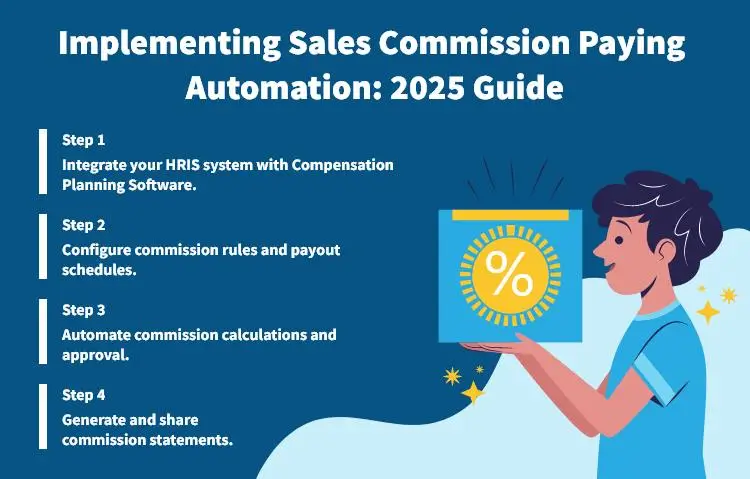
Connect your HRIS to Compensation Planning Software to sync employee and role data. This integration enables the use of predefined rules for setting commission structures and ensures accurate tracking of payouts from a single, reliable source.
Define commission structures based on roles, quotas, commission data, or accurate sales data volume. Configure payout schedules, whether quarterly, monthly, or biweekly, to match your business rhythm. The tool also supports complex commission structures and rules, making it easier to manage different plans across teams.
Compensation Planning Software handles commission calculations automatically, so there’s no need for spreadsheets. It uses real-time sales commissions data to set performance-based rewards and ensures timely payments through streamlined approval workflows. This makes it easier to manage, approve, and pay commissions on time.
The best thing about this sales commission automation software is that it automatically generates clear, detailed commission statements. This allows your sales operations team to easily see how their commission earnings are calculated.
Switching to commission-paying automation tools can feel like a big change, especially for teams used to manual calculations. However, the benefits are clear—more accurate payouts, less admin effort, and faster results. Salary.com's sales compensation software makes accurate commission calculations easier and keeps the process clear and efficient.

The latest research, expert advice, and compensation best practices all in one place.
Blog
Bringing trusted compensation intelligence and seamless planning to even more ADP users.

Blog
Learn how to train managers for effective pay conversations and build trust.

Blog
Total rewards package flexibility lets employees choose what matters - pay, perks, and benefits tailored to their needs.