Blog
Get Pay Right on ADP Workforce Now® Next Gen™
Bringing trusted compensation intelligence and seamless planning to even more ADP users.
Written by Salary.com Staff
August 09, 2024

Automating your payroll system is a game-changer for businesses of all sizes, from small startups to large corporations. These services simplify paying your employees by reducing errors and saving time, making the process almost effortless.
Salary.com's Consulting Services can help your organization integrate payroll automation into existing systems and solve payroll problems with data-driven solutions.
Payroll automation is the process of using software to manage and streamline the entire payroll process. Automated payroll systems reduce the need for businesses to do manual data entry. This ensures that employee wages are paid correctly and on time while minimizing human error.
Automated payroll software handles tasks such as payroll calculations, tax withholdings, and direct deposits. This not only simplifies payroll processing but also helps business owners stay compliant with tax laws and focus on growing their businesses.
Salary.com's Compensation Consulting can help solve payroll challenges by delivering innovative and efficient data-driven solutions; all backed by over 70 years of compensation and total rewards experience.
Starting to use payroll software becomes essential as soon as managing payroll manually begins to feel overwhelming. For small business owners, automating payroll processes can save time, reduce errors, and ensure compliance with tax laws, making payroll automation a smart choice for even a few employees.
Similarly, medium to large businesses should consider starting with payroll software as soon as managing payroll manually becomes time-consuming and prone to errors, especially with the rising number of employees.
Automating payroll can save business owners significant time and reduce errors by eliminating tedious tasks like entering employee hours manually.
Not only do employees get paid accurately and on time, but this initiative also becomes a great step forward for broader financial automation in areas like accounting and vendor management.
Since payroll can be complex and time-consuming, here are the benefits of payroll automation that organizations can expect:
Efficient payroll processes
Payroll automation software simplifies payroll processing tasks by eliminating manual payroll processes, ensuring accuracy, and saving time for payroll managers.
Accurate tax calculations
An automated payroll system ensures precise payroll tax calculations, reducing errors and ensuring compliance with federal income tax regulations.
Timely employee payments
Using an automated payroll solution guarantees timely direct deposit and wage deductions which enhances employee satisfaction and reduces administrative burdens.
To further develop employee satisfaction, Benefits Program Evaluation can help review how employees currently perceive your benefits offerings, and develop competitive new benefits plans that fit within your budget.
Comprehensive payroll reports
Automated payroll software generates detailed payroll reports. This provides payroll managers with insights into financial planning and efficient payroll operations.
Enhanced data security
Payroll automation offers a secure way to handle payroll data, protecting sensitive employee salary calculations and personal information from unauthorized access.
When choosing the best automated payroll software for your organization, consider these key features:
Federal, state, and local tax filing
The payroll system automates accurate tax calculations and filings to simplify compliance with tax regulations.
Time and attendance tracking
Capture employee work hours seamlessly to conduct payroll calculations and attendance management.
Employee self-service access
Empower employees to view pay stubs, update personal information, and manage direct deposit preferences independently.
PTO (Paid time off) tracking
Tracks and manages paid time off (PTO) accruals and usage efficiently, ensuring accurate employee leave management.
Employee data management
Centralize and secure employee information such as contact details, salary history, and tax forms within the payroll system for easy access and compliance.
Organizations can also take advantage of Data Governance to help find inconsistencies, inaccuracies, and opportunities in employee data.
Reporting
Generates customizable reports on payroll expenses, tax withholdings, and other financial data to support informed decision-making.
Software integrations (i.e., time tracking, accounting, benefits)
Compatibility with existing systems like time tracking and accounting software for efficient data flow and eliminate manual processes.
Additional pay adjustments (like reimbursements or bonuses)
Capability to handle various pay components beyond base salary, such as bonuses, commissions, and reimbursements, with accuracy and ease.
Compensation and Benefits Program Design can improve the strategic value of your pay programs and design benefit packages that deliver a clear competitive advantage while containing costs.
In the process of integrating payroll automation into existing systems, you may come across these challenges:
Integration complexity: One common challenge is the complexity of integrating new automated payroll software with existing accounting systems. If not addressed, this can result in inaccurate payroll calculations and delays in paying employees.
Compliance with regulations: Ensuring compliance with tax laws and regulations, such as payroll taxes and filing tax forms can be a challenge when transitioning. Failure to address compliance issues can lead to penalties, fines, and legal complications for the business owner.
Pay Equity Audit and Certification Consulting can assess differences in pay and determine if they are justified under the law.
Employee training: Training employees to use new self-service features and understand how to access pay stubs and tax forms through the automated system can be time-consuming. Without adequate training, employees may struggle to use the system effectively.
Data security concerns: Protecting sensitive payroll data from cybersecurity threats is important when implementing automated payroll processes. Disregarding data security can result in data breaches, identity theft, and reputational damage to the payroll provider or business.
Resistance to change: Overcoming resistance to change among payroll managers and HR professionals who may be accustomed to manual processes is also a significant challenge.
To help ease the transition period, Life Cycle Audits provide HR technology strategies to stay ahead of the next change that comes along.
Payroll systems allow companies to focus more on strategic goals and less on administrative tasks. Here are seven simple steps to save time in payroll automation for your business:
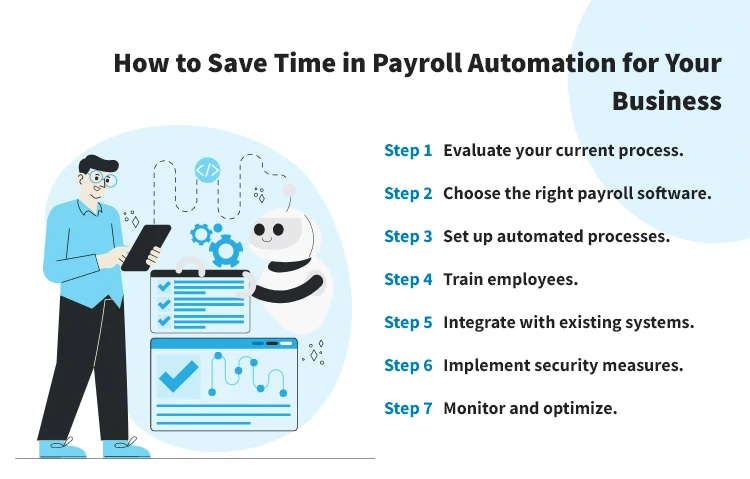
Assess your existing payroll process to identify bottlenecks and repetitive tasks that can be automated using payroll automation software.
Select the payroll automation software that best fits your business needs and size. Look for features such as automatic data processing, direct deposit capabilities, and tax calculation functionalities to streamline payroll tasks.
Set up the payroll system to automate routine tasks such as employee paycheck calculations, tax withholdings, and filing taxes. This saves time on manual data entry and reduces the likelihood of errors in payroll records.
Provide comprehensive training to your payroll manager and staff on how to use the new payroll software effectively. This ensures they are familiar with processing direct deposits, managing employee benefits, and utilizing the payroll tool to its full potential.
Integrate the payroll automation software with other relevant systems like HR and accounting software for seamless data exchange. This integration enhances efficiency by minimizing duplicate entries and maintaining payroll records accurately.
Ensure the payroll system has strong security features to protect sensitive employee information and comply with data privacy regulations. This includes securing access to payroll functions and regularly updating software to safeguard against potential cyber threats.
Continuously monitor the automated payroll process to identify areas for improvement and optimization. Regularly review payroll reports, tax filings, and employee benefits management to ensure accuracy and efficiency in payroll operations.
Payroll automation simplifies the process of paying employees accurately and on time. Businesses that fail to adapt to the new era of task automation may spend excessive time on payroll tasks, detracting time from more strategic activities like employee development and business growth. Salary.com's Consulting Services can help your organization integrate payroll automation into existing systems and solve payroll problems with data-driven solutions.

The latest research, expert advice, and compensation best practices all in one place.
Blog
Bringing trusted compensation intelligence and seamless planning to even more ADP users.

Blog
Learn how to train managers for effective pay conversations and build trust.

Blog
Total rewards package flexibility lets employees choose what matters - pay, perks, and benefits tailored to their needs.