Blog
Get Pay Right on ADP Workforce Now® Next Gen™
Bringing trusted compensation intelligence and seamless planning to even more ADP users.
Written by Salary.com Staff
May 17, 2024

For rapidly expanding businesses, particularly those with a global workforce, the use of compensation tools can revolutionize operations. These management tools empower organizations to streamline the compensation process, offer competitive packages and foster transparency.
Consequently, an efficient compensation management system can lead to enhanced employee retention, smoother hiring processes, and heightened productivity and engagement. The good news is that there are tools like Salary.com’s Compensation Software that you can use to achieve these benefits.
This article will provide a step-by-step guide on how to set up the compensation tool for your company, along with important factors you should consider when looking for a good compensation tool.
A compensation tool is software that simplifies managing employee pay. It helps businesses plan, analyze, and implement fair and competitive compensation strategies. The software also serves as a specialized planning platform, organizing and optimizing employee data and budget planning to create effective compensation packages.
Some tools, like Salary.com's Compensation Software, offer various features such as market pricing, job range wizard, reporting and analytics, and labor cost forecasting.
The primary objective of compensation management software is to alleviate the workload for managers and HR professionals by:
assisting users in constructing competitive compensation packages,
facilitating the sharing of company compensation protocols among users,
enabling smooth import and export of data; and
providing a centralized dashboard for displaying compensation-related information.
Your compensation tools should simplify various analyses, including:
Market data analysis
Make sure your tool can check what other companies pay for similar jobs. This helps you decide if your pay is competitive. For instance, Salary.com's compensation management tool offers access to extensive market pricing data, allowing accurate pricing for every job in various pay markets.
Internal equity analysis
Look for features that help analyze and address internal pay fairness. Identify and rectify any disparities across job roles, levels, or demographics to ensure equity within your organization.
Performance analysis
Seek tools that link pay to performance metrics, enabling evaluation and appropriate rewards based on individual and team achievements. Compensation Software's Merit Modeling feature facilitates this by directly linking compensation to performance outcomes.
Cost analysis
Choose tools with features for budget management. These should allow modeling different pay scenarios and calculating the financial impact of compensation changes.
Compliance analysis
Ensure your tool helps maintain legal and regulatory compliance, such as identifying gender-based pay gaps. Features for creating and sharing compliance reports enhance transparency and accountability.
Many companies, of all sizes, are adopting compensation management tools like those offered by Salary.com to streamline processes and enhance financial tracking. As technology advances, these tools continue to evolve to meet the growing needs of businesses.
An effective compensation tools include:
Compensation planning and administration: These tools streamline the payment process, facilitate collaboration, and empower HR and finance departments to configure, adjust, and oversee compensation packages efficiently.
Benefits administration: This feature integrates and displays all aspects of the compensation package, offering a comprehensive view of the entire payment structure.
Time tracking: Automated time tracking functionalities ensure accurate recording of employees' work hours, guaranteeing timely and correct payment disbursement.
Employee self-service: Providing employees with access to financial information and records promotes financial transparency and empowers individuals to manage their own data.
Here are some benefits of using compensation management tools in your workplace.
Data-driven decision making: Compensation management tools grant access to extensive salary data and market trends, empowering businesses to make informed decisions regarding employee compensation. With real-time and precise information, organizations can ensure that their pay practices stay competitive and in line with industry standards.
Fair and transparent compensation: These tools promote transparency by providing employees access to their salary data and market comparisons. Transparent compensation practices foster trust and confidence among employees, as they can comprehend the reasoning behind their pay and acknowledge the organization's commitment to fairness.
Enhanced compensation planning: Compensation management tools streamline the process of crafting and implementing compensation plans. HR professionals can efficiently allocate budgets, establish salary ranges, and tie pay to performance metrics. This automation and accuracy save time and reduce errors in the compensation planning phase.
Attraction and retention of top talent: Offering competitive compensation packages is pivotal in attracting and retaining skilled individuals. Utilizing compensation management tools empowers organizations to compare their salary offerings with industry benchmarks, thereby maintaining their attractiveness to prospective hires and retaining top-performing employees.
Compensation tool provides flexible solutions tailored to your organization's needs. With the help of the Salary.com’s Compensation Software, you get reliable market pricing data for different jobs, empowering you to make informed pay decisions. It also helps mitigate risks, reduce costs, and streamline processes. Here’s a guide on how to use this modern tool.
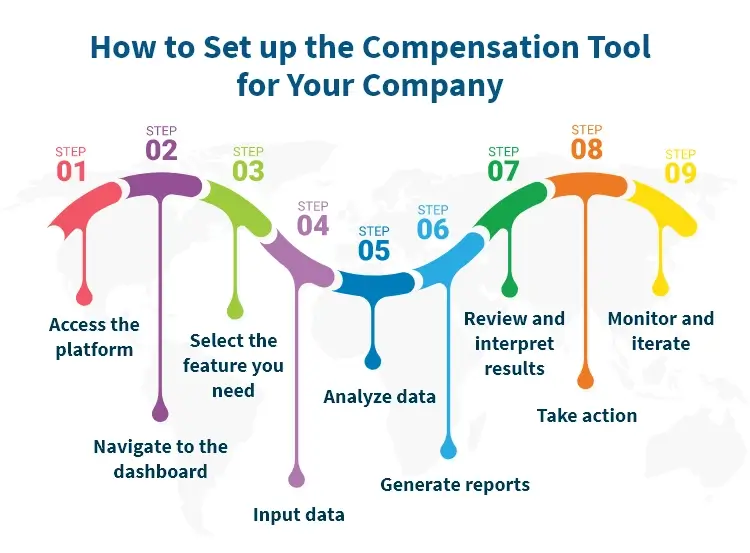
Log in to the Compensation Software platform using your credentials provided by your organization or through the designated portal.
Upon logging in, you will be directed to the dashboard where you can see various tools and features available within the Compensation Software suite.
Identify and select the specific tool within the Compensation Software that you need for your analysis.
Once you've selected the tool, begin inputting the relevant data. This might include company job listings, employee information, pay markets, and salary structures.
Utilize the analysis tools provided by the Compensation Software to interpret the data you've inputted. This could involve comparing company jobs to industry standards, assessing individual employees' salaries against market rates, or conducting other relevant analyses.
Compensation Software's Pay Equity Reporting Toolkit helps HR managers analyze internal pay differences by employee group and generate equal employment opportunity reports for protected classes like age, ethnicity, and gender.
After analyzing the data, generate reports to summarize your findings and insights. These reports can be customized based on your specific needs and can include visualizations to aid in understanding.
Compensation Software makes it easy for HR managers to create, edit, and share reports analyzing compensation across the organization.
Review the generated reports and interpret the results to gain actionable insights. This may involve identifying areas where salaries need adjustment, understanding market trends, or making strategic decisions related to workforce management.
Based on the insights gained from the analysis, take appropriate action within your organization. This could include salary adjustments, talent management strategies, or other initiatives aimed at improving overall organizational performance.
Continuously monitor the impact of the actions taken and iterate on your analysis as needed. Compensation software provides ongoing support for data analysis and decision-making, allowing you to refine your approach over time.
Implementing compensation tools effectively requires following best practices:
Inclusive involvement: Involve all stakeholders from the start. This ensures everyone contributes their insights and understands the plan, reducing surprises and misunderstandings.
Detailed action plan: Make a detailed plan for each department involved. Clearly outline roles and expectations to make the transition smooth.
Prioritize backend operations and security: Work closely with IT to address backend operations and security. Make sure to follow IT protocols and allocate resources for integration, especially since compensation data is sensitive.
Thorough testing: Test extensively before going live. Start with dummy data and move to a sandbox environment to mimic real situations. Only proceed when testing confirms the tool works accurately.
Strategic timing for go-live: Choose a weekend for the go-live to minimize disruptions. Ensure support is available during the weekend for any final adjustments.
Setting up a compensation tool for your company is a strategic process that requires careful planning and execution. Salary.com's Compensation Software can simplify your compensation management processes with features like market pricing, job matching, HR technology integration, salary structure, and pay equity analytics.

The latest research, expert advice, and compensation best practices all in one place.
Blog
Bringing trusted compensation intelligence and seamless planning to even more ADP users.

Blog
Learn how to train managers for effective pay conversations and build trust.

Blog
Total rewards package flexibility lets employees choose what matters - pay, perks, and benefits tailored to their needs.