


Blog
Get Pay Right on ADP Workforce Now® Next Gen™
Bringing trusted compensation intelligence and seamless planning to even more ADP users.
Written by Salary.com Staff
October 16, 2026
A payroll ledger stands as a core tool for any employer managing staff to pay and related costs. It tracks every detail of employee compensation across each pay period, so finance and HR teams can keep payroll accurate and meet tax rules.
A clear payroll ledger helps identify discrepancies early and supports better financial reporting. Using a structured payroll ledger protects the business from calculation errors and strengthens tax compliance from the employer side.
A payroll ledger is a statement that shows all employee payments, deductions, and costs incurred by the employer for a pay period. It is the primary source of payroll information used by accounting and financial statements.
For employers, it is used to track labor cost and ensure the net salary accurately reflects the amount paid to employees. It can be used for tax purposes and provides clarity to auditors regarding payroll expenses.
A payroll ledger also contains information such as gross pay, tax withheld from gross pay, employee benefit deductions, and employer taxes. Unlike time records, a payroll ledger clearly documents the transition from gross to net pay.
Compensation data can also be reviewed alongside payroll information to help identify pay patterns, compare compensation levels, and support compensation planning. CompAnalyst® provides compensation analytics for this type of analysis.
A payroll ledger contains every key payroll component needed for accurate employee payroll tracking and tax reporting.
Employee details such as name ID and pay rate form the base of each entry so the ledger can handle multiple employees without mix ups.
Gross pay or gross wages for the pay period appear first and include hourly wages plus any overtime or bonuses earned during that cycle.
Tax withholdings cover federal tax and other required amounts taken from employee pay before net pay is calculated.
Payroll deductions list voluntary deductions like health insurance premiums for retirement contributions and other benefit deductions that lower taxable income.
Employer's contributions and employer taxes show the company's share of payroll tax and retirement plans, so total payroll costs stay visible.
Net pay column records the final amount paid to each worker after all deductions and net pay calculations are complete.
Dates of the pay period and payment help match entries to bank statements and support later tax preparation.
Payroll ledgers differ from other books because each serves a distinct role in tracking payroll related transactions and feeding financial reporting.
| Feature | Payroll ledger | Payroll journal | General ledger |
|---|---|---|---|
| Main purpose | Detailed record of employee compensation deductions and net pay for each pay period | Chronological list of payroll journal entry records that summarize daily or weekly payroll activity | Broad summary of all company accounts including wages expense and benefits payable |
| Level of detail | High detail for each worker including hourly wages and tax liabilities | Medium detail showing total payroll expenses and employer taxes per run | Lower detail that posts totals from the payroll system into overall accounts |
| How it supports the business | Helps identify discrepancies and monitor labor costs directly | Creates the payroll journal entry that moves numbers into accounting records | Supports financial statements and accurate reporting of total payroll costs |
| Typical user | HR and payroll teams who create a payroll record | Accounting staff who post payroll journal entry records | Finance leaders who review system reports and tax forms |
CompAnalyst® helps employers create compensation reports and analyze compensation information. It can support finance and HR teams when reviewing payroll related compensation data.
Employers can create a payroll record either by hand or with dedicated payroll software to keep payroll information complete and ready for audits.
Collect current employee data and hours for the pay period. This will ensure accurate initial data.
Enter gross pay for each employee and apply taxes and voluntary deductions using current tax laws.
Add employer taxes and employer contributions. This will provide a complete view of the costs associated with payroll and labor.
Determine net pay and enter the net pay field as well as the payment date. These fields will allow statements to be easily compared to actual payments.
Compare the completed payroll to time data and previous payroll information to ensure accuracy prior to tax filing.
Save the completed monthly payroll information with other payroll information for the required period of time.
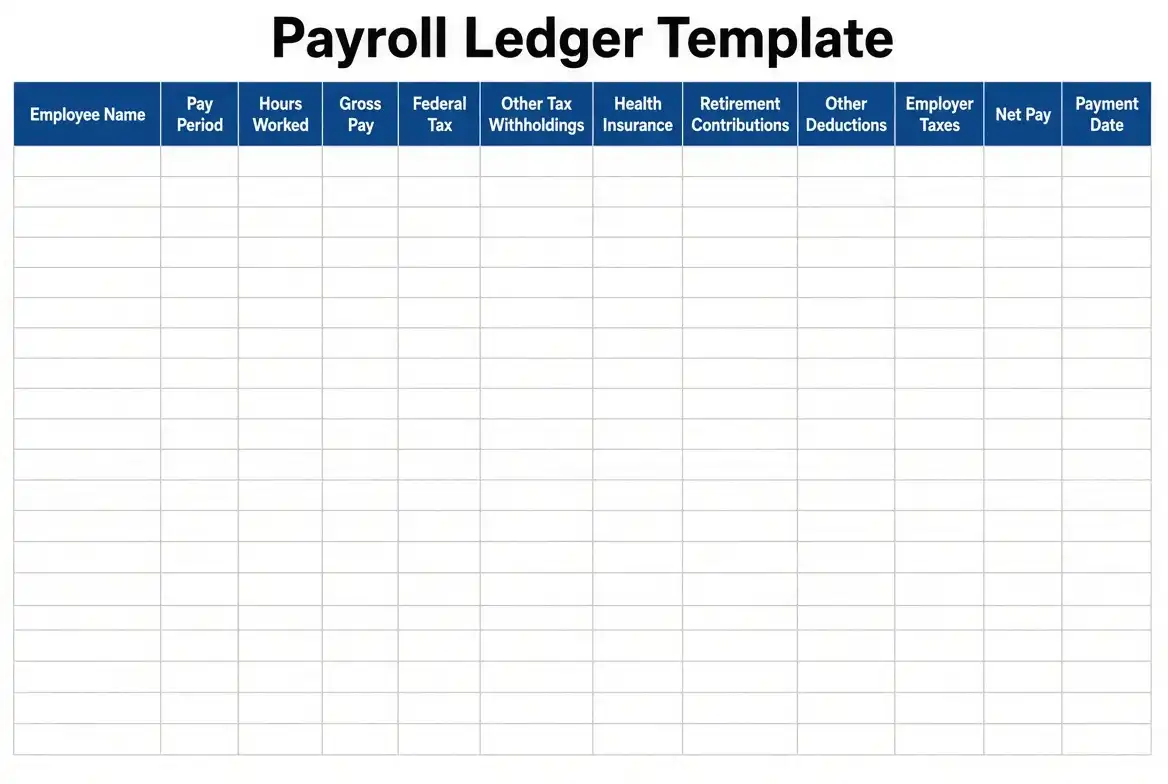
A practical template for a payroll record has columns for employee name, pay period starts and end dates, hours, gross pay, federal tax, other tax, health insurance, retirement contributions, other deductions, employer taxes and payment methods.
Include a totals row at the bottom of each column to allow finance to easily identify the total amount of pay and benefits to be paid. Allow space for notes to indicate any exceptions or adjustments.
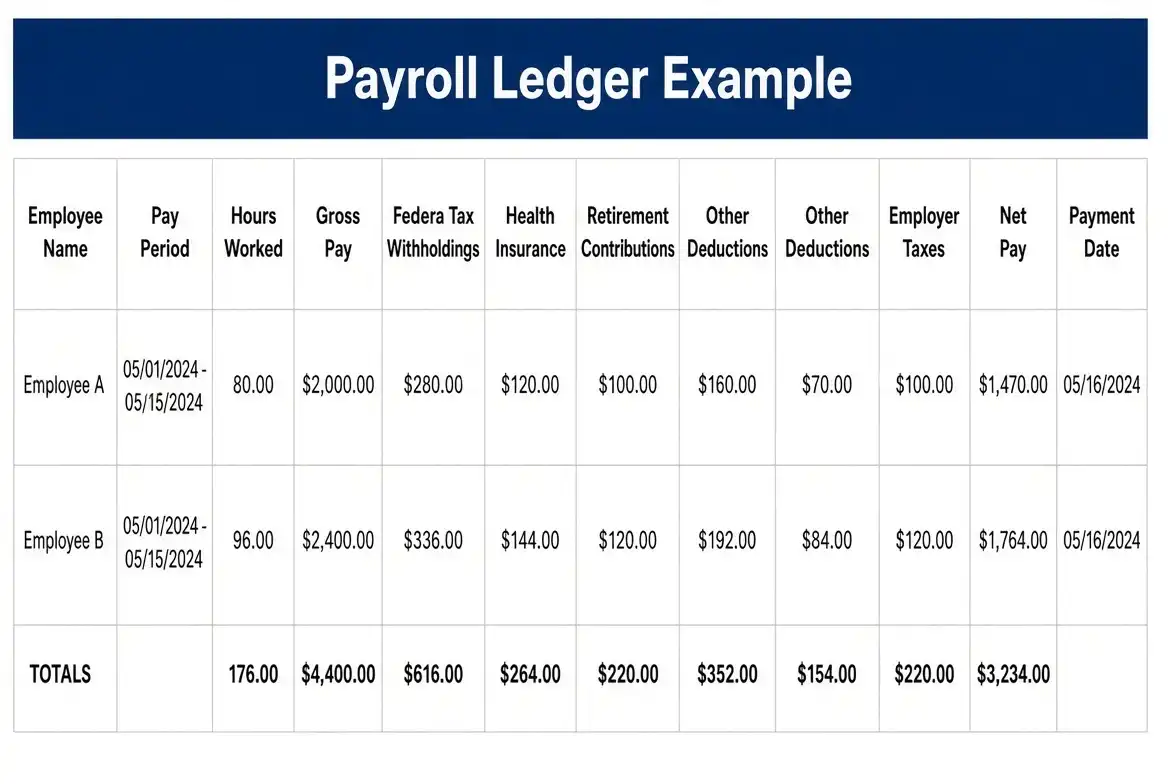
Below is an example of a payroll record for one pay period for two employees.
Employee A: 80 hours worked at $25 per hour. Gross pay = $2000. Withholdings: Tax = $350, Health Insurance = $100, Retirement = $80. Employer Taxes = $150. Net Pay = $1470.
Employee B: 80 hours worked at $30 per hour. Gross pay = $2400. Withholdings: Tax = $420, Health Insurance = $120, Retirement = $96. Employer Taxes = $180. Net Pay = $1764.
Totals: Gross Pay = $4400. Total Deductions: $1570. Net Pay = $3234. Total Payroll Cost (including employer side) = $4730.
This example of a payroll record demonstrates the advantages of using a well-organized payroll record. All employee payments are displayed clearly and can be used for financial statements.
A well-maintained payroll record gives employers better control over payroll processing and labor costs. It helps finance teams monitor labor costs in real time and prepare accurate payroll reports for leadership.
Automating payroll records with payroll software cuts manual data entry and lowers the chance of calculation errors. The ledger supports tax compliance by keeping tax liabilities and employer taxes organized for tax forms and tax filings.
Clear payroll record records also make it easier to identify discrepancies before they affect employee pay or bank statements. Over time, a consistent payroll register improves overall payroll accuracy and strengthens accounting records used in financial reporting.
Here are some FAQs for better understanding.
No. A ledger is not a balance sheet. A payroll or general ledger records specific payroll transactions over time (e.g. wages expense, benefits payable). A balance sheet provides a point in time to view a company's assets, liabilities, and equity.
Both are used by employers, and payroll transactions are part of the larger financial statements.
There are three common types of ledgers. They are the general ledger, the subsidiary ledger, and the payroll ledger (or payroll record). The general ledger contains summary data for the entire organization.
Subsidiary ledgers contain details for either accounts payable or employee payroll data. The payroll record contains only data regarding employee payroll, payroll taxes, and related fees. Having this close to a team allows for easier access.
Payroll can be done in Excel if a company chooses to manually operate a payroll record. A company can create a payroll record using Excel and input gross hours, gross pay, and any deductions.
However, using dedicated payroll software will decrease the amount of data entry required and increase the accuracy of the payroll results, particularly as the business expands to have multiple employees.

The latest research, expert advice, and compensation best practices all in one place.
Blog
Bringing trusted compensation intelligence and seamless planning to even more ADP users.

Blog
Learn how to train managers for effective pay conversations and build trust.

Blog
Total rewards package flexibility lets employees choose what matters - pay, perks, and benefits tailored to their needs.
